Amazon GREF: alignment with Takeda and Allianz
Status: Accepted design — implementation documented in the GREF runbook | Last reviewed: 2026-10-13
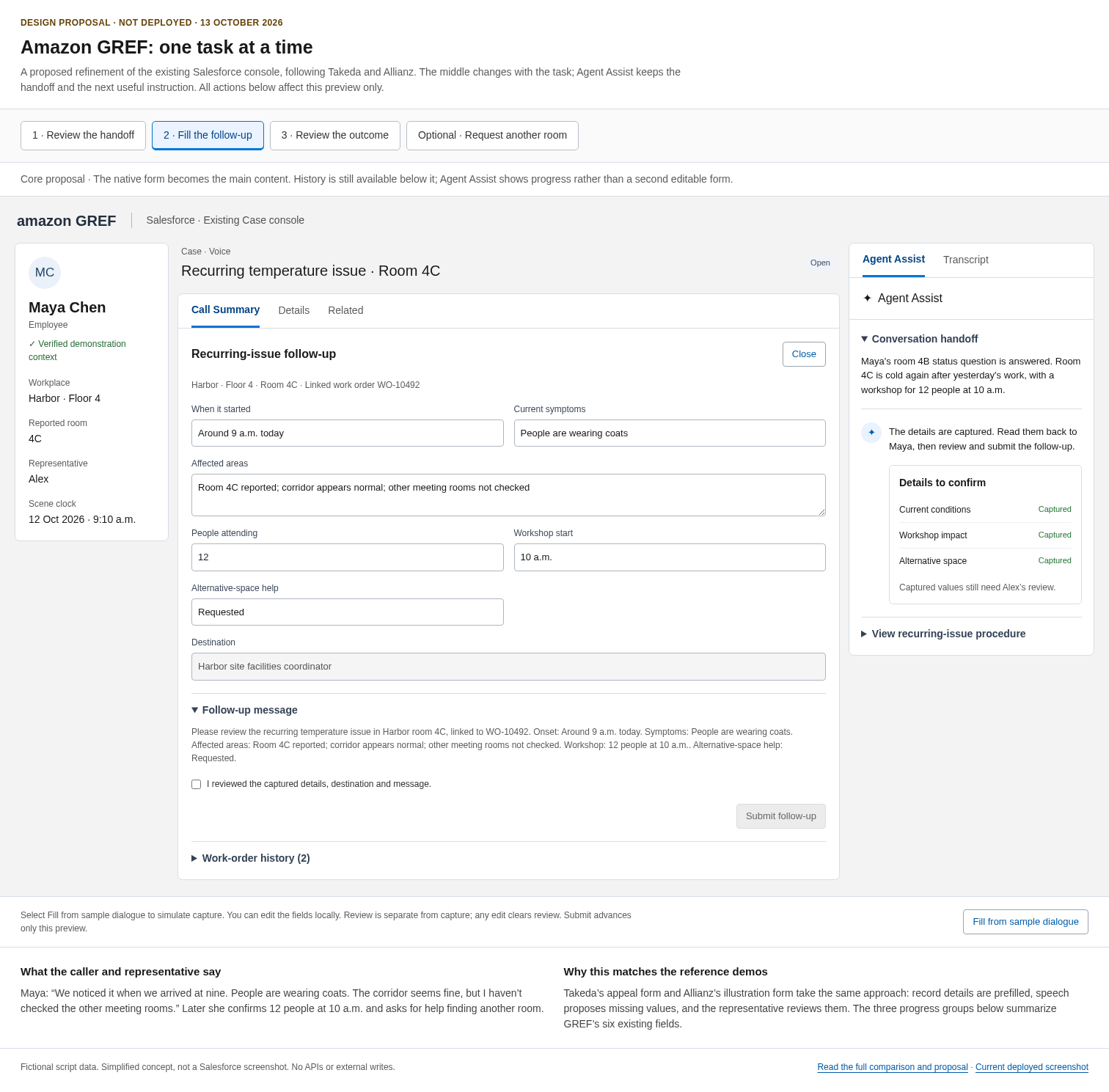
Implemented direction: retain the existing Salesforce console and make Call Summary a task workspace: work-order context → speech-filled follow-up → conditional room request → saved outcomes. Agent Assist contains the expanded two-sentence handoff and one current instruction, with a compact progress checklist when a form is open. The accepted second form helps Maya request another room for her workshop.
The audit and proposal below preserve the reasoning behind the change. The release runbook records the deployed Copilot v10, catalogue 4.0.1, profile revision 7 and qualification.
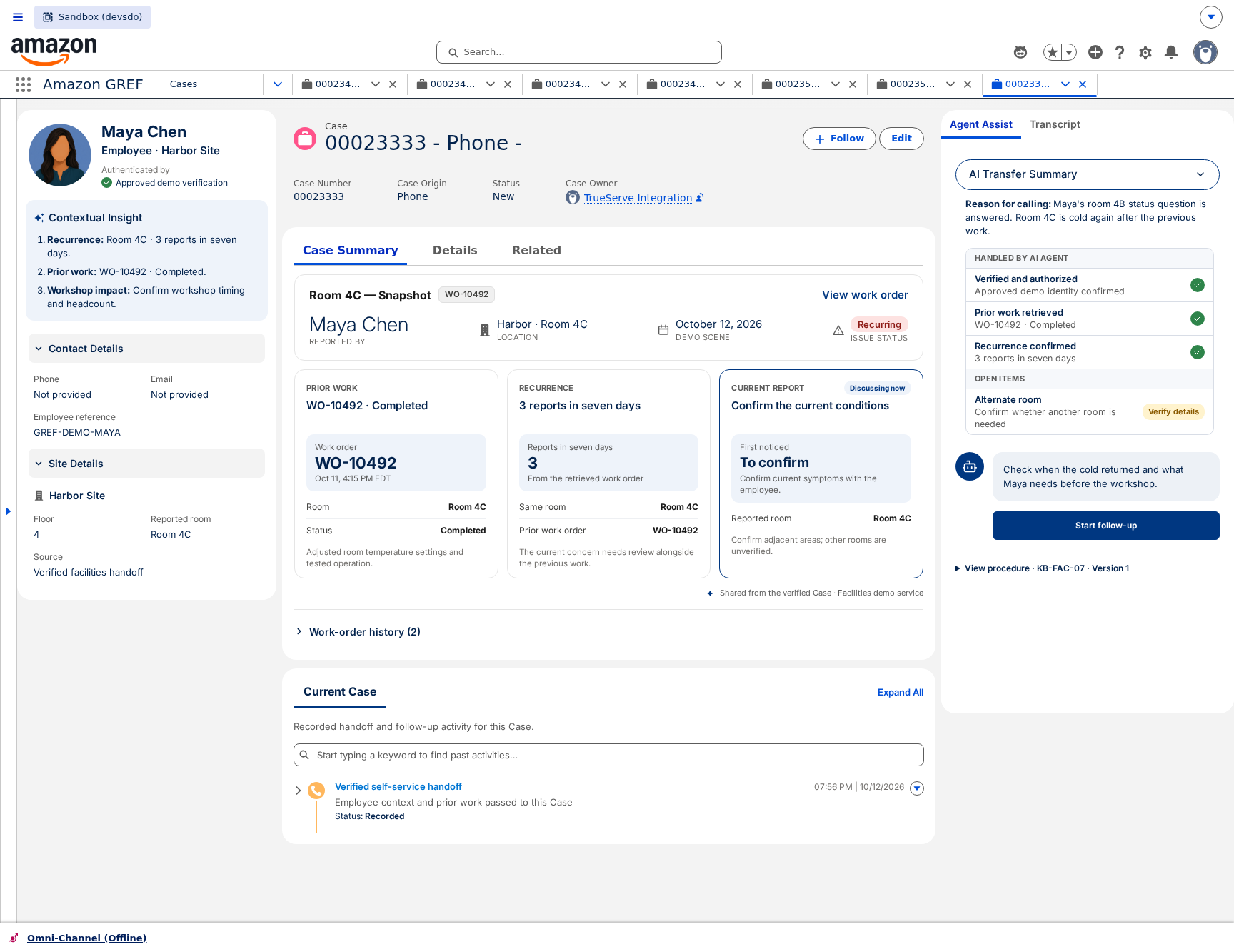
Open the interactive proposal. It is an illustrative preview using fictional script data, not a Salesforce capture or a connected application. The static preview shows the captured form and compact guidance together. The current deployed screenshot and current presenter script remain separate.
What the reference implementations actually do
Read-only published-configuration checks on October 13 confirmed:
| Reference | Published configuration | Relevant pattern |
|---|---|---|
| Takeda Clear Connect Salesforce app | Copilot 4465 v7, takeda-assist 5.0.8, StageAssist |
One guidance surface follows transfer → policy → appeal → follow-up → wrap-up. Native inquiry summary hides while the native appeal form is open. |
| Older Takeda Clearway variant | Copilot 4450 v19, same catalogue | Similar staged composition, but a different agent and host. It is not the agent assigned to the Clear Connect multi-case page. |
| Allianz Support Services | Copilot 4870 v19, allianz-illustration-assist 4.0.7, ProducerJourney |
Contract context gives way to the illustration form. Submission restores context with the saved receipt. The rail tracks five input groups without duplicating the editable form. |
| Amazon GREF at the initial audit | Copilot 4928 v9, amazon-gref-assist 3.0.0 |
Native, source-backed FacilitiesGuide plus separate live coaching and headless six-field capture. History remains above the active form; receipt and employee update add more center content. |
The installed DCC_Patient_Service_Multi_Case_Page was retrieved from DevSDO.
It assigns agent 4465, mounts dccMultiPatientInquirySummary and
dccMultiPatientAppealForm in the middle, and uses
dccMultiPatientRightPanel for Agent Assist and Transcript.
Its form publishes appeal.visibility; the summary hides while the form is
visible and refreshes after submission. Both this form and Allianz send targeted
form_context confirmations and complete the capture worker after a successful
submission.
The strongest common pattern is a current task, explained in the rail and performed in Salesforce. The reference catalogues are different domain implementations, not one interchangeable form component.
Apply these patterns to GREF
| Area | Proposed GREF behavior |
|---|---|
| Page structure | Keep allianzRecordTemplate, native Case highlights and tabs, allianzMfeBase, the shared transcript and DCC wrap-up. Keep the GREF bridge as the single owner of Case context and actions. |
| Handoff | Two natural sentences in Agent Assist; expanded initially and retained across stages unless the representative collapses it. No handoff in Call Summary. Takeda's automatic collapse is deliberately not adopted. |
| Guidance | One active instruction and one main action. Fold relevant live coaching into that composition instead of stacking a separate generic empathy card. Do not repeat empathy after Alex has already expressed it. |
| Dynamic middle | Show history initially. Opening the form replaces the main history view, with history available in a collapsed disclosure in Call Summary. Closing preserves the draft and restores history. Successful submission replaces the form with the receipt and current employee-update task. |
| Capture | Keep six editable fields in the native form. Group progress in Agent Assist into Current conditions, Workshop impact, and Alternative space. Show what remains to ask, not a second full list of field values. |
| Evidence | Keep the prior work-order note and KB-FAC-07 under short source disclosures. Source facts, scope, saved receipts and completion remain native authority; the model can suggest wording and extract proposed values. |
| Language | Address Alex with a concrete next step. Use short task verbs: Start follow-up, Save draft, Submit follow-up, Review update, Wrap up. Keep demonstration delivery limitations next to the relevant result rather than repeating them in every coaching sentence. |
| Form lifecycle | After a successful reviewed save, confirm the saved values to gref-capture / gref-followup. After accepted submission, also send targeted form_control: complete. A click, model output or command acknowledgement is not a save receipt. |
Reuse the shared host and transport components directly. Reuse the
GuidanceMessage / checklist / disclosure composition from the reference
catalogues; their domain-specific React components are not currently a shared
presentation package. Extract neutral presentation primitives only where useful,
without importing Takeda patient assumptions or Allianz policy fields. Preserve
GREF's tested CSS behavior inside the shared renderer.
Proposed core script and screen sequence
The example uses the existing authored scene: October 12, 2026, 9:10 a.m., America/New_York. It does not use the browser's current date. Copy containing headcount, time or previous work is only available when those facts exist in the verified record or actual dialogue.
Expanded handoff
Maya's room 4B status question is answered. Room 4C is cold again after yesterday's work, with a workshop for 12 people at 10 a.m.
The original full conversation remains available for context and audit. Generate this short display from supported handoff facts; do not merely take the first two sentences of a long Case description. If the employee has not stated a workshop size or time, omit that clause.
| Beat | Conversation | Call Summary | Agent Assist |
|---|---|---|---|
| 1. Receive the transfer | Alex: “Maya, I can see this has happened again. I'll link the follow-up to the earlier work and check what you need for the workshop.” | Standard-looking work-order related list. WO-10481 remains Scheduled; WO-10492 remains Completed, with its previous note available. | Expanded handoff. “Check when the cold returned and what Maya needs before the workshop.” Start follow-up. |
| 2. Capture the recurrence | Maya: “We noticed it when we arrived at nine. People are wearing coats. The corridor seems fine, but I haven't checked the other meeting rooms.” | Form replaces the main history view. Onset, symptoms and affected-area fields populate as suggestions. The other-room caveat stays visible. | “I'll fill the follow-up from your conversation. Confirm the workshop details and whether Maya wants help finding another room.” Three progress groups. |
| 3. Review the request | Alex confirms 12 people at 10 and asks about alternative-space help. Maya explicitly requests it. Alex reads the captured details back. | Six fields, destination and follow-up message. Corrections remain editable; changes invalidate the review checkbox. Only reviewed values can be submitted. | “The details are captured. Read them back to Maya, then review and submit the follow-up.” No additional empathy card or duplicate form. |
| 4. Record the outcome | Alex submits and receives the saved queue receipt. | Receipt replaces the form. Employee-update review becomes the active task; history remains accessible. | “The follow-up is recorded. Confirm the next update with Maya and review the message.” Receipt status does not imply dispatch or repair. |
| 5. Close the call | Alex communicates the actual outcome and next step, then uses the existing wrap-up. | Saved outcome and employee-update status. | Short closing wording from saved facts, then Wrap up. The facilities Case stays open awaiting review. |
WO-10481/10492 are synthetic external service records, not Salesforce
WorkOrder rows. Keep their related-list appearance and provenance; do not
fabricate a standard relationship or additional work orders.
Optional story extension: keep the workshop running
Recommend this as a second, conditional task after the facilities follow-up:
Alex: “Would you like me to request another room while facilities reviews this?”
Maya: “Yes. We need space for twelve from ten until eleven, preferably on this floor, with a screen.”
Alex: “I'll include those requirements. The workplace team still needs to confirm availability.”
The 11 a.m. end time, floor preference and screen requirement are proposed new dialogue, not facts in the current script. This step must only appear after the caller requests it.
The middle changes to an Alternative-space request form, prefilled with verified location and already confirmed workshop details. It captures the remaining end time and preferences from the new conversation, with unknown preferences left blank. Alex reviews it, submits it and sees a separate request receipt linked to the same Case. The rail provides one instruction and progress for this form. A summary row preserves the earlier facilities receipt.
This gives the story two distinct outcomes: a recurring-issue follow-up and a request to keep the workshop running. It does not require pretending that facilities has fixed the room or that another room is booked.
Implementation needs a separate gref-workspace-support form ID, an authorized
request action and durable receipt, destination/owner configuration, updated
script fixtures and qualification. Existing dynamic-form support can install an
approved schema on a configured worker when this task opens. Do not replace the
first form's schema while it has unsaved fields: schema replacement clears
proposed and confirmed values. Use explicit worker/form targets and, if
repeatable, a new instance so old transcript facts do not fill a new request.
There is currently no room inventory or booking integration. A first demo implementation can record a clearly labelled coordination request; real availability and reservation would be a separate integration.
The current authored 10 a.m. update commitment coincides with the workshop start. For this extended story, propose a caller-agreed 9:30 a.m. progress update. Store it once in the scenario/request data and use it in the employee message, review confirmation and follow-up Task. This is a proposed change, not a deadline inferred from the current record.
Delivery scope and acceptance
The accepted implementation includes the core composition, existing six fields and the conditional second request. See the GREF runbook for the released versions and qualification results. The core work does not need another model call before the initial Salesforce screen renders, nor any change to the Connect welcome/async Case preparation.
The standalone proposal was checked in Chromium at desktop and 390-pixel widths. Stage navigation, local example capture, review invalidation after edits, draft preservation, receipt replacement and handoff expansion all passed. Those checks validate the review artifact only; they do not qualify a Salesforce change.
Qualification must show:
- One active native task and one current guide, with an expanded handoff and accessible history throughout the human journey.
- Source-derived handoff variants for missing workshop details and a 4B-only inquiry; no substitution of the example script into an unrelated Case.
- Real speech fills the intended form only; manual edits and clears win, unknown rooms stay unverified, and an explicit request is needed for alternative-space assistance.
- Successful saved values reach the targeted capture worker; submission completes it. Save failures retain the draft and offer a retry. Reloading a submitted Case restores the receipt without regressing to an empty form.
- For the extension, independent receipts and no cross-form or cross-Case leakage, with a requested room clearly distinguished from a confirmed booking.
- An actual answered Connect call verifies screen pop, both transcript speakers, capture, employee-update result and existing wrap-up together. That live representative test remains outstanding; this audit does not replace it.
Source trail
- Allianz live Salesforce composition, native center, catalogue composition and native prompt branch.
- Takeda staged catalogue and native guide/form definitions. The installed Clear Connect bundles and published configurations were also read back privately during this audit; the older maintained Takeda workspace is supporting precedent, not a substitute for that deployed page.
- Current GREF center, bridge and authored scenario.
- Existing live-form controls.